Jev Explained: A New AI Model for Decisions, Not Conversations
Understand Jev through a simple customer-support example: what it decides, how it works with other AI, and where people still need to check its answers.
A customer sends a message: “I was charged twice for my order. Can someone look into this?”
Before the company replies, it needs to answer a few simple questions. Should the message go to the billing team? Is it urgent? Does someone need to review it?
Think of a receptionist who sends visitors to the right department. The receptionist does not need to write a long report for every visitor. Often, choosing the right destination is enough.
That is the kind of job Jev is designed to help with. You give it information and a question. It returns a choice, a score, or the estimated chance of “yes.”
This article explains how that idea could fit into a business system. You do not need to write code to follow it. There is a small developer example near the end.
The article was inspired by Claire Vo’s Jev experiments in Lenny’s Newsletter. Product details come from TypeSafe AI, the company behind Jev, and were checked on 28 September 2026. The support example and diagrams below are my suggested designs, rather than examples of systems I have deployed with Jev.
Why use a large language model for every small decision?
A large language model, or LLM, is the kind of AI used to write replies, summarize documents, and explain ideas. It can also sort a message into a category.
But consider our billing complaint. At the sorting step, the system only needs one answer: billing, technical support, or something else. Writing a paragraph is a separate job.
Using a general-purpose AI for every step can add cost and waiting time. It can also make mistakes harder to find. If the message goes to the wrong team, was the problem in understanding it, choosing the team, or writing the reply?
I would split the work into three steps: understand the message, check the business rules, and write a reply if one is needed. That gives each part of the system a clear job.
LLMs can return answers in a fixed format too. Jev should still earn its place by doing the actual task well, at a useful cost and speed.
What is Jev? What does “System One” mean?
TypeSafe AI introduced Jev on 15 September 2026. It calls Jev a System One Model: AI intended for quick decisions with a defined set of possible answers.
The name borrows from the idea of fast, intuitive thinking. It describes the intended use; it does not mean every answer will be right.
Instead of asking “Write a reply to this customer,” you might ask “Which of these three teams should receive this message?” You provide the available choices and explain what each one means.
TypeSafe calls the information you send the state. For our example, that means the customer’s message and any relevant details you choose to include.
According to TypeSafe’s documentation, Jev accepts text, including text arranged as JSON data. It does not directly accept images, audio, or video, and it does not write explanations.
Three ways to ask Jev a question
Choice: “Which team should handle this?”
Give Jev a list such as billing, technical support, and other. It selects one option and returns numbers showing how it weighs the different choices. It also returns a confidence value. See TypeSafe’s overview.
Include other. If none of your categories fits a real message, the system needs somewhere sensible to send it.
Score: “How urgent does this sound?”
Describe the levels: a routine question, a problem with a workaround, or a problem that stops the customer from working.
Jev can then give a score along that scale. In TypeSafe’s Score format, those three levels are numbered 0, 1, and 2. The result can sit between levels, such as 1.4, because it combines how strongly the input fits each level.
Treat this as an estimate for sorting work. It is not a measurement of how long the problem has lasted. Urgency and customer frustration may also need separate questions.
Yes/No: “Did the customer ask for a person?”
TypeSafe calls this option Noul. It returns a number from 0 to 1 estimating the chance that the answer is yes. A result near 0.5 means the model is unsure. There is no separate confidence field. See the Noul documentation.
The application decides when that number is high enough to send the message to a person. The right cutoff needs testing on real examples.
Keep the question specific. “Did the customer ask for a refund?” is about understanding the message. “Is the customer allowed a refund?” also needs payment records and company rules.
Jev, rules, and LLMs: which does what?
| Tool | A useful job | Example | What can go wrong? |
|---|---|---|---|
| Rules and ordinary code | Check known facts or exact conditions | Check payment records for two charges | A rule or record may be wrong or incomplete |
| Jev | Choose or score based on the meaning of text | Send the complaint to billing | It may choose the wrong team |
| An LLM | Create text, summarize, or work through a question | Draft a reply using checked payment details | It may write something incorrect |
All three can work together. A simpler text classifier—a tool trained to put text into categories—may also do the sorting job. Compare the options before adding a new service.
For our complaint, Jev can suggest “billing.” Payment software must check whether two charges actually happened. Company rules decide whether a refund is allowed.
A simple support-system design
Here is how I would connect those parts:
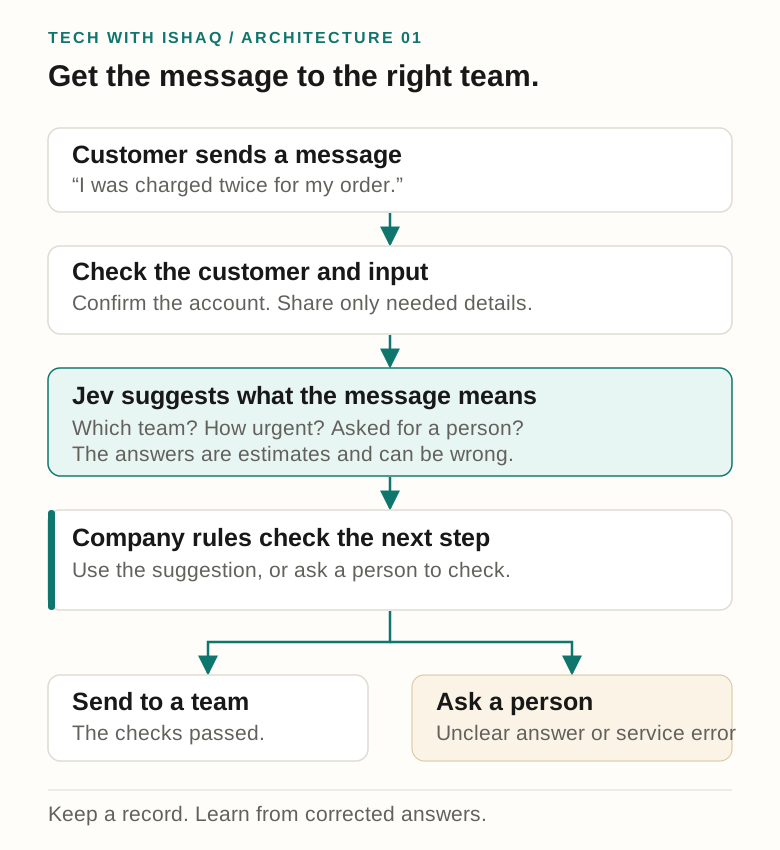
First, check who sent the message and which account it belongs to. Share only the information needed for the question. Jev then suggests the team and urgency.
The application checks whether it can safely use that suggestion. If the answer is unclear, or Jev is unavailable, send the message to a person or a general support queue.
Keep a record of what happened: which model and question wording were used, how long it took, where the message went, and whether someone corrected the result. Store only the customer information you need.
Also make sure a retry cannot trigger the same action twice. A model that returns tidy answers still needs the same reliability checks as any other outside service.
How Jev and an LLM can work together
Jev could sort incoming messages first. Then an LLM could write replies for the messages that need them. Claire Vo describes a similar combination for email in her newsletter article.
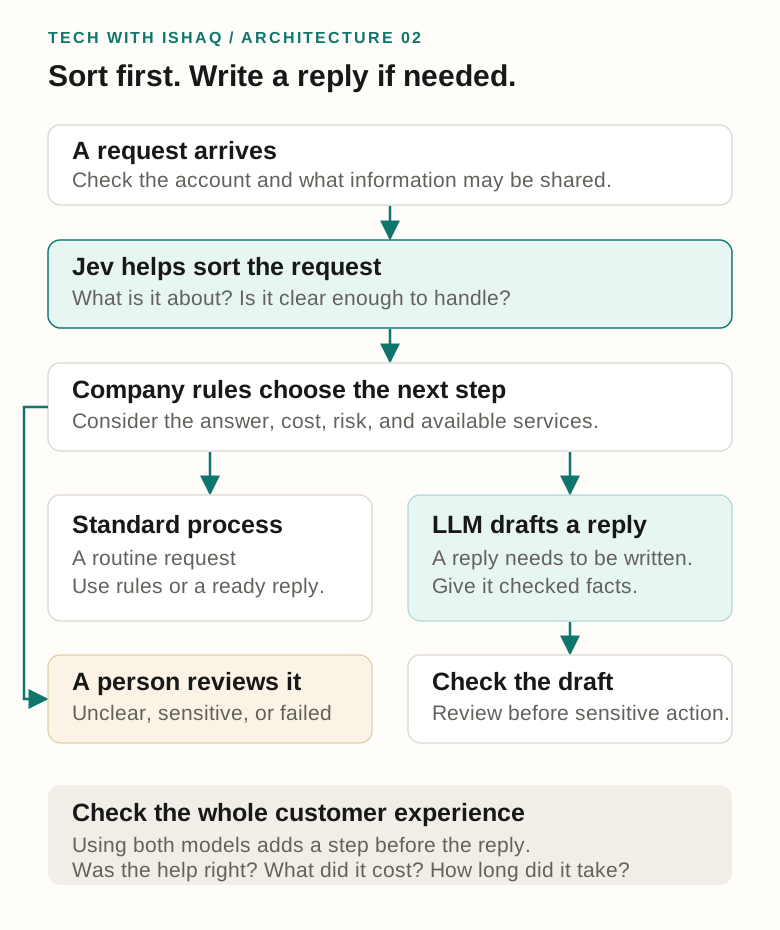
A routine request might receive a standard reply. A more detailed request might need an AI-written draft based on checked account information. An unclear or sensitive case should go to a person.
This approach may save money because fewer messages reach the writing model. But a message that goes through both models has an extra step. A cheaper process is not automatically a faster one.
Measure whether customers get the right help, how much the whole process costs, and how long it takes—including the slowest cases. Comparing category labels alone does not tell you whether the system helped the customer.
Where businesses could try Jev
- Customer feedback: sort comments into themes such as pricing, usability, and missing features.
- Support requests: suggest the team and urgency, with a person checking unclear cases.
- Engineering reports: group code changes by purpose. Claire Vo reports sorting about 1,700 pull requests—proposed code changes—for $0.09.
- Finding useful information: select relevant passages before another AI writes an answer. Check that it does not throw away important evidence.
- Review queues: flag messages that may need a specialist. Check both missed cases and unnecessary alerts.
Vo also reports experiments with about 1,100 feedback signals, 200,000 classifications, and 4,500 YouTube comments in Lenny’s Newsletter. These are her reported examples, not results from my own tests.
Start with work where a wrong choice can be corrected easily. Processing lots of messages cheaply still leaves practical limits: how many requests the service allows and how much work the review team can handle.
What about cost and speed?
On 28 September 2026, TypeSafe’s website listed $42 per billion input tokens, or $0.042 per million. Tokens are the small pieces of text that AI services use for billing. Its model documentation listed output tokens as free. Prices can change.
For example, suppose 10,000 messages each use 800 billed input tokens, including the questions and other information sent with them. That is 8 million tokens, costing about $0.34 in Jev input charges at the listed price.
That is only one part of the bill. It excludes repeated requests, storage, other AI calls, and staff time spent reviewing mistakes.
In its launch announcement, TypeSafe reported 193.6 times faster and 444.6 times cheaper results for the workflows it tested. The company says those gains are likely toward the high end of real-world results. Its LLM comparison also included extra work to produce matching answers and probabilities.
These are TypeSafe’s benchmark claims, not a promise for every business or a benchmark I ran. Test your own process and count the cost of mistakes as well as the price of each call.
“Type-safe” does not mean “correct”
Imagine a form that only lets you choose billing, technical support, or other. Every answer fits the form. You can still choose the wrong department.
That is the difference here. Type-safe means the answer follows the required format. It does not mean the decision is right. TypeSafe explains its zero type-error result as a guarantee about matching the answer format. Its “zero hallucinations” wording should not be read as a guarantee that Jev never misclassifies a message.
Confidence also needs care. TypeSafe describes it as a number calculated from the spread of possible answers. A confidence of 0.9 does not automatically mean “this answer is correct 90% of the time.”
Test clear messages, confusing messages, messages with two problems, different writing styles, and attempts to trick the model. Ask people to label a useful sample, then compare Jev’s answers with theirs.
Before letting it act, run it alongside the existing process and observe its choices. Introduce it gradually, keep a way to return to the old process, and continue checking some answers even when the model seems confident.
Limits to keep in mind
TypeSafe’s Jev 1.13 limitations page lists weaknesses with exact numbers, dates, indirect wording, irrelevant information, hostile instructions, and consistency between separate questions. Those notes apply to that model version; future versions may differ.
The practical lesson: let ordinary code calculate totals, compare dates, and check permissions. Give Jev clear questions and relevant text. Test unusual and misleading inputs.
Jev does not explain its answer. If another AI writes an explanation afterward, that is a new interpretation—not proof of how Jev reached its choice.
Also check how the provider handles business data, where the service is available, its request limits, and what happens during an outage. A useful model still needs to fit the company’s requirements.
An architect’s checklist, in plain English
A solution architect decides how the parts of a system should work together. For Jev, I would use this checklist:
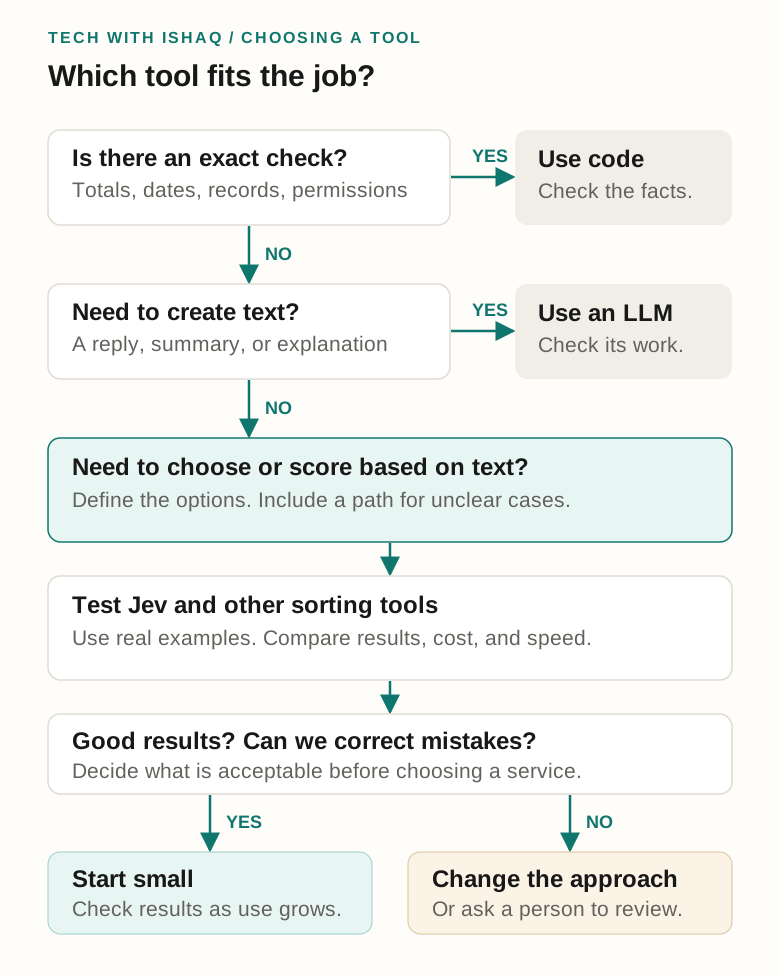
- Can a rule or database answer this exactly? Use ordinary code for totals, payments, dates, and permissions.
- Do we need new text? An LLM may suit a reply, summary, or explanation.
- Do we need a choice or score based on text? Jev may be worth comparing with other sorting tools.
- Can we test it with real examples? Decide how many mistakes, how much cost, and how much waiting time are acceptable.
- What happens when it is wrong? Have a clear review path and a way to stop or reverse the action.
My first trial would be sorting support messages or grouping feedback. Both are easy to measure, and mistakes can usually be corrected before they cause serious trouble.
For developers: a small API example
An API is a way for one piece of software to ask another for something. You can skip this section if you only want the overall idea.
This example follows TypeSafe’s HTTP quick start. It sends a message and a question to POST https://api.typesafe.ai/v1/systemone, using a private access token kept on the server.
{
  "model": "jev-latest",
  "state": {
    "message": "I was charged twice for my order."
  },
  "questions": {
    "team": {
      "type": "choice",
      "instructions": "Choose the team that should handle this message.",
      "criteria": {
        "BILLING": "Charges, invoices, or payments",
        "TECHNICAL": "A product feature is not working",
        "OTHER": "Neither team fits, or there is not enough information"
      }
    }
  }
}
The application reads answers.team.choice and the accompanying numbers. It checks the result before sending the message to a team. If the answer is unclear or the request fails, it uses the review queue.
For repeatable tests, use an available fixed model version rather than a latest-version alias. In a Java/Spring Boot application, keep the Jev call separate from the code that checks business rules. This makes each part easier to test and change.
For the customer who was charged twice, the important result is simple: the message reaches the right person, the payment records are checked, and the customer receives an accurate reply. Jev may help with the first step. The rest of the system still has work to do.